Legacy Product Software & Manual Summaries
This page contains an overview of the software supplied
with legacy and discontinued products.
Some of the summaries also include user manual table of contents.
The listed links jump to sections of interest below.
The software itself is available from our
Legacy Downloads page.
Software Summaries
• SER1CH-UA
• PARxCH (x = 1,4,8)
• PARGPS
• PAR24B
• DSPA64/HLF
• DSP32C Boards
SERxCH Software Summary
A complete software package comes with each SER1CH-UA-BANA or SER1CH-UA-DSUB. Finished applications, function libraries, and source code are included. With these tools you can start acquiring data right away and also write custom applications. Acquired data is easy to use with other popular programs.
Summaries of the finished applications are shown below. See the PDF user manual for more details. Software is available for Windows and Linux. The most recent software and manual are available for free from the SER1CH-UA section of our Legacy Downloads page.
Finished Applications:
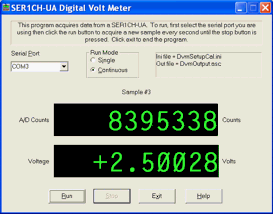
DVM
This is a digital volt meter program in two versions. DvmGui provides a
Windows GUI interface while DvmCmd is text only. Both display acquired
values as voltages or other scaled user units like inches. Data is
displayed as it becomes available, and is also written to an output
file. An initialization file is used to specify calibration and
display units. For convenience, two different unit scalings
are displayed on the screen for the single SER1CH-UA channel.
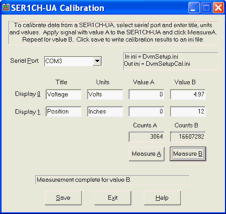
CAL
This calibration program is a companion for DVM. CalGui is the Windows
GUI version and CalCmd is text only. Both compute the calibration
values needed to convert A/D counts into scaled user units. The
calibration information is saved in a DVM initialization file.
|
|
Function Libraries:
Functions like Open, Close, and GetData are included for basic system
control. The functions are written in C and provide all the tools
needed for writing custom applications. Refer to finished applications
like DVM and CAL as examples. The libraries are available in static
or DLL format. See the user manual for detailed function descriptions.
|
|
PARxCH Software Summary
A complete software package comes with each PARxCH (PAR1CH, PAR4CH, and PAR8CH). Finished applications, function libraries, and source code are included. With these tools you can start acquiring data right away and also write custom applications. Acquired data is easy to use with other popular programs.
Summaries of the finished applications are shown below. See the user manual for more details. Software is available for Windows and Linux. The most recent software and manual are available for free from the PARxCH section of our Legacy Downloads page.
Finished Applications:
SIMP
This is a simple text only acquisition program. Data is displayed as it
becomes available, and is also written to an optional output file. An
initialization file is used to specify sampling rate and display
parameters. Great for use with unattended acquisition and
low power PCs. Uses the same file formats as Scope.
SCOPE
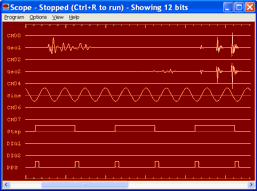
This is a Windows GUI oscilloscope trace display program. Data is
displayed as it becomes available, and is also written to an optional
output file. An initialization file is used to specify sampling rate
and display parameters. Uses the same file formats as Simp.
VIEW
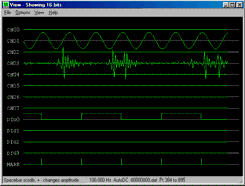
This is a Windows GUI trace display playback and review program for
viewing previously acquired data. Works for data files produced
by Simp and Scope.
|
|
METER
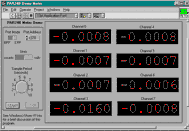
This text only program displays acquired values as voltages as data becomes available. Individual channel
calibration is included.
DIAG
This text only diagnostic program verifies the PARxCH and its
connection with the PC. Use at installation time or after unexpected
behavior is observed.
DAT2ASC
This text only program converts binary .dat files created by Simp or
Scope into ASCII text files suitable for import into popular analysis
and plotting programs.
TWO TASK
Multitasking systems allow for acquiring data while concurrently
performing further processing. This example shows how to acquire data
while using a simple threshold trigger to control file saving. The
acquisition and processing tasks run in separate windows for Windows
and as foreground/background processes under Linux.
ACQUIRE
This is a sample acquisition program written in Visual Basic.
Function Libraries:
Functions like Open, Close, and GetData are included for basic system
control. The functions are written in C and provide all the tools
needed for writing custom applications. Refer to finished applications
like Simp and Meter as examples. The libraries are available in static
or DLL format. See the PDF user manual for detailed function descriptions.
Using with Other Programs:
PARxCH data are compatible with many general purpose software
packages. Some examples include:
EXCEL, MATLAB, GNUPLOT
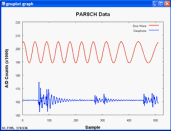
Data acquired with Scope can be converted to simple ASCII text files
with Dat2Asc. These can be read or imported by popular analysis and
plotting programs like Excel, MatLab, and GnuPlot.
VISUAL BASIC, LABVIEW, TESTPOINT
The PARxCH function libraries can be called from a wide range of
programming languages like Visual Basic as well as programs like
LabView and TestPoint. Users must provide an interface specifying
the arguments for each DLL function in the format required by their
program. See the Acquire program for a Visual Basic example.
Demo LabView VI's and applications are also provided.
|
|
PARGPS Software Summary
A complete software package comes with each PARGPS. Finished applications, function libraries, and source code are included. You can start timestamping data right away and have the tools for writing custom applications.
Summaries of the finished applications are shown below. See the User Manual for more details. The most recent manual and software are available for free from the PARxCH section of our Legacy Downloads page.
|
|
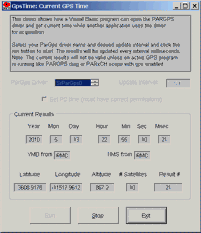
Function Libraries:
Functions like Open, Close, ReadData, and GetCurrentTime are included
for basic system control. The functions are written in C and provide
all the tools needed for writing custom applications. Refer to
finished applications like CURRTIME, GPSTIME, and PARxCH SIMP as examples.
The libraries are available in static or DLL format. See the
user manual for detailed function descriptions.
Using with Other Programs:
The PARGPS is compatible with many general purpose software
packages. Some examples include:
VISUAL BASIC, FORTRAN
The PARGPS function library can be called from a wide range of
programming languages like Visual Basic. See the GpsTime and DiagNmea
programs for examples.
LABVIEW, TESTPOINT
The function libraries can also be called from programs like LabView
and TestPoint. Users must provide an interface specifying the
arguments for each DLL function in the format required by their
program. Several LabVIEW demo VI's and applications are provided.
PAR24B Manual & Software Summary
The table of contents from the PAR24B manual and the list of directories on the PAR24B product disk are shown below. The manual and software are available free from the PAR24B section of our Legacy Downloads page.
A complete software package comes free with each PAR24B 24 bit, 8 channel data acquisition system. The included software contains finished applications, low level libraries and source code. This means you can start acquiring data right away. And later customize the source code for your application.
| Chapter 1: | Introduction | |
| Chapter 2: | Installation | |
| Chapter 3: | DLL Library Support | |
| Chapter 4: | Finished Applications / Simp24b / Scope24b | |
| Chapter 5: | LabView Support | |
| Appendix A: | Electrical Specs & Calibration | |
| Appendix B: | FIFO Buffer Depth | |
| Appendix C: | PAR24B circuit diagrams |
| include | Include files for Library functions | |
| dll | Library functions | |
| simple | Simp24b text only acquisition program | |
| scope | Scope24b Windows GUI acquisition program | |
| meter | Meter text only voltage meter program | |
| 2task | Two task processing demo | |
| labview | LabVIEW Support | |
| diags | Diagnostic program | |
| examples | Example programs | |
| suds | Conversion program - IASPEI SUDS format | |
| docs | Manual and A/D spec sheet |
SIMP24B
This is a simple "text only" acquisition program. Acquisition
parameters such as sampling rate, gain, and output file size are
specified in ASCII form in an initialization file. Acquired data can
be presented on the screen as text values and saved to the hard disk
in binary multiplexed format. This program is perfect for
applications where the acquisition will run unattended or for lower
power PCs where a complicated GUI interface would be excessive.
SCOPE24B.EXE
This is a full Windows GUI interface program that displays acquired
data as horizontal traces on the screen. Acquired data is scrolled
across the screen as it comes in and is also saved to disk. All
acquisition parameters, such as sampling rate, gain, and output file
size, are set by dialogs reached from pull down menus. Hot keys like
up and down arrow can be used to adjust the number of displayed bits
for the signal level you are using. The binary file format is exactly
the same as for simp24b.
METER
This is a simple text only program that displays acquired values as
voltages on the screen. Data is presented the instant it becomes
available as it would be with a typical DVM. The program includes
individual channel calibration.
DIAG
The system diagnostic can be used after installation or any other time
to verify that the A/D board is correctly connected and communicating
with the PC. This utility can prove very valuable in the field when
connecting new hardware.
TWO TASK SUPPORT
Under multitasking systems like Windows and Linux you can run acquisition
as one task while a second task examines the acquired data files and
performs further processing. Typical second window activities might
include items like triggering accept/reject decisions on files so an
excessive amount of data does not build up on the hard disk. The 2task
example included with the system shows how to run a simple threshold
trigger. Under Windows, each task typically runs in its own window.
Under Linux, the acquisition task usually runs in the background while
the processing task runs in the foreground.
LABVIEW SUPPORT
LabVIEW drivers and finished applications paralleling the other
software are provided. The applications are a finished scope
acquisition and LED meter
display program. These programs are "ready to go" and do not require
any user programming, but you must have a copy of LabVIEW in order to
use them. Full LabVIEW "G" source code is provided.
LIBRARY SUPPORT
Basic driver support is provided as a collection of library functions
that let you initialize, start acquisition, and copy results to the
PC. The library source code can be compiled to either static or DLL
(shared library) format with no changes and is written in standard
ASCII C. See below for a list of functions.
| PAR24B_Init | Initializes PAR24B w/ sample rate, gain, etc | |
| PAR24B_Start | Begins PAR24B acquisition | |
| PAR24B_IsReady | Checks FIFO half full flag | |
| PAR24B_GetData | Reads a buffer worth of data FIFO | |
| PAR24B_Stop | Ends PAR24B acquisition | |
| PAR24B_SpsToFp | Converts Samples/Sec to Filter Point value | |
| PAR24B_FpToSps | Converts Filter Point value to Samples/Sec | |
| PAR24B_FifoSizeToNvalues | Computes the number of samples in a data buffer | |
| PAR24B_Overflow | Checks FIFO full flag | |
| PAR24B_IsEmpty | Checks FIFO empty flag | |
| PAR24B_ReadFifo | Reads 1 sample for each channel from FIFO | |
| PAR24B_UserByte | Controls user byte value, yellow LED shows bit 0 |
DSPA64/HLF Manual & Software Summary
The table of contents from the DSPA64/HLF manual and the list of directories on the DSPA64/HLF product disk are shown below. The manual and software are available free from the DSPA64/HLF section of our Legacy Downloads page.
A complete software package comes free with each DSPA64/HLF 16 bit, 64 channel data acquisition system. The included software contains finished applications, low level libraries and source code. This means you can start acquiring data right away. And later customize the source code for your application.
| Chapter 1: | Introduction | |
| Chapter 2: | Installation | |
| Chapter 3: | Hardware basics | |
| Chapter 4: | DLL Library Support | |
| Chapter 5: | Finished Applications / Simpa64 / Scopea64 | |
| Chapter 6: | LabView Support | |
| Chapter 7: | Low level example programs | |
| Chapter 8: | System Diagnostic Utility | |
| Appendix A: | Electrical Specs & Calibration | |
| Appendix B: | DSPA64 circuit diagrams | |
| Appendix C: | DSPHLF circuit diagrams |
| include | Include files for Library functions | |
| dll | Library functions | |
| simple | Simpa64 text only acquisition program | |
| scope | Scopea64 Windows GUI acquisition program | |
| 2task | Two task processing demo | |
| labview | LabVIEW Support | |
| diags | Diagnostic program | |
| examples | Example programs | |
| suds | Conversion program - IASPEI SUDS format |
SIMPA64
This is a simple "text only" acquisition program. Acquisition
parameters such as sampling rate, filter coefficient, and output file
size are specified in ASCII form in an initialization file. Acquired
data can be presented on the screen as text values and saved to the
hard disk in binary multiplexed format. This program is perfect for
applications where the acquisition will run unattended or for lower
power PCs where a complicated GUI interface would be excessive.
SCOPEA64.EXE
This is a full Windows GUI interface program that displays acquired
data as horizontal traces on the screen. Acquired data is scrolled
across the screen as it comes in and is also saved to disk. All
acquisition parameters, such as sampling rate, filter coefficient,
and output file size, are set by dialogs reached from pull down
menus. Hot keys like up and down arrow can be used to adjust the
number of displayed bits for the signal level you are using. The
binary file format is exactly the same as for simpa64.exe.
DIAG
The system diagnostic can be used after installation or any other time
to verify that the A/D board is correctly connected and communicating
with the PC. This utility can prove very valuable in the field when
connecting new hardware.
TWO TASK SUPPORT
Under multitasking systems like Windows or Linux you can run acquisition
as one task while a second task examines the acquired data files and
performs further processing. Typical second task activities might
include items like triggering accept/reject decisions on files so an
excessive amount of data does not build up on the hard disk. The 2task
example included with the system shows how to run a simple threshold
trigger. Under Windows, each tasks is typically run in its own window.
Under Linux, the acquisition task usually runs in the background while
the processing task runs in the foreground.
LABVIEW SUPPORT
LabVIEW drivers and a finished application paralleling the other
software are provided. The application is a finished scope display
acquisition program. This program is "ready to go" and does not require
any user programming, but you must have a copy of LabVIEW in order to
use it. Full LabVIEW "G" source code is provided.
LIBRARY SUPPORT
Basic driver support is provided as a collection of library functions
that let you initialize, start acquisition, and copy results to the
PC. The library source code can be compiled to either static or DLL
(shared library) format with no changes and is written in standard
ASCII C. See below for a list of functions.
| DSPA64_Init | Initializes DSPA64 w/ sample rate, filter coefficients, etc | |
| DSPA64_Start | Begins DSPA64 acquisition | |
| DSPA64_IsReady | Checks when a buffer is full | |
| DSPA64_GetData | Reads a buffer worth of data FIFO | |
| DSPA64_Stop | Ends DSPA64 acquisition | |
| DSPA64_GetBaseio | Returns base I/O address for DSPHLF card | |
| DSPA64_SetBaseio | Sets base I/O address for DSPHLF card | |
| DSPA64_ClearReady | Clears buffer full flag | |
| DSPA64_SpsToNCount | Converts samples/sec to decimation count | |
| DSPA64_NCountToSps | Converts decimation count to samples/sec | |
| DSPA64_TailToCoeff | Converts filter tail off rate to a coefficient | |
| DSPA64_CoeffToTail | Converts filter coefficient to a tail off rate | |
| DSPA64_NormalizeScale | Compute normalized filter scale from coefficient | |
| DSPA64_NTimingTicks | Sets clock rate which controls sampling rate | |
| DSPA64_MaximumRate | Returns maximum sampling rate | |
| DSPA64_BufferSize | Computes the number of samples in a data buffer |
DSP32C Manual & Software Summary
The table of contents from the DSP32C Coprocessor Board manual and the list of directories on the DSP32C product disk are shown below. The manual and software are available free from the DSP32C section of our Legacy Downloads page.
A complete software package comes free with each DSP32C digital signal processing board. The included software contains diagnostic programs, examples, an assembler, a monitor/debugger, low level libraries and source code. This means you can start acquiring data right away. And later customize the source code for your application.
| Chapter 1: | Introduction | |
| Chapter 2: | Installation | |
| Chapter 3: | Memory Mapping | |
| Chapter 4: | DSPMON Monitor | |
| Chapter 5: | DSPTOOLS System Utilities | |
| Chapter 6: | DSPASM Assembler | |
| Chapter 7: | DSPMATH Math Library | |
| Chapter 8: | DOS Graphics Library | |
| Chapter 9: | Program Examples | |
| Chapter 10: | Circuits |
| include | Include files for library functions | |
| bin | Executable files - DSPASM, DSPMON | |
| lib | Libraries - DSPTOOLS, DSPMATH | |
| dspasm | DSP32C Assembler | |
| dsptools | System utility functions and DSPMON source | |
| dspmath | Math library functions | |
| diags | Diagnostic program | |
| examples | Example programs | |
| 32bit | 32 bit versions |
DSPASM.EXE
The DSPASM assembler is designed to process source files with Agere
mnemonics and high level control constructs to produce located object
files that can be directly downloaded and executed on the coprocessor
board. It is ideal for code development requiring fast edit and
execute cycles. Some of the features of DSPASM are: free format
source code, symbolic register names, nops emitted for CAU but not DAU
instructions, forward references, and C like conditional syntax
including if, while, and for loops.
DSPMON.EXE
The DSPMON program is a software tool for monitoring and controlling
the DSP32C coprocessor boards by hand. Its commands are quite similar
to those of debug or symdeb for the 80x86 on the PC, and users
familiar with those programs should find DSPMON easy to use. Using
DSPMON is a good way to get familiar with the coprocessor board. No
damage can occur from anything done within DSPMON.
DSPTOOLS SYSTEM UTILITIES LIBRARY
The DSPTOOLS system utilities library is a collection of functions
for controlling the execution of the DSP32C coprocessor boards from C
programs running on the PC. With it, you can upload and download the
DSP32C boards from programs you write. In fact, the DSPMON monitor is
an example of a program that makes use of these functions, where each
operation allowed in the monitor corresponds to a function call in
the DSPTOOLS library. See DSPTOOLS functions
below for a list of functions.
DSPMATH MATH LIBRARY
The DSPMATH library is a collection of math functions
for the DSP32C coprocessor boards. With this library, functions can
be called from high level languages without having to program the
board directly. It is one of the easiest ways to begin getting
results from the DSP32C boards. See DSPMATH functions
below for a list of functions.
| DSP32C_Init | Initializes the DSP32C | |
| DSP32C_Pcr | Reads from the DSP32C PCR register | |
| DSP32C_Pir | Reads from the DSP32C PIR register | |
| DSP32C_Esr | Reads from the DSP32C ESR register | |
| DSP32C_Emr | Reads from the DSP32C EMR register | |
| DSP32C_SetPir | Writes to the DSP32C PIR register | |
| DSP32C_SetEni | Writes to the DSP32C ENI register | |
| DSP32C_Go | Begins DSP32C execution | |
| DSP32C_Halt | Ends DSP32C execution | |
| DSP32C_Get | Copies data from the DSP32C to the PC | |
| DSP32C_Put | Copies data from the PC to the DSP32C | |
| DSP32C_PutLong | Copies a long integer of data from the PC to the DSP32C | |
| DSP32C_SrHexLoad | Copies program data from the PC to the DSP32C | |
| DSP32C_GetBaseIo | Returns the DSP32C board base I/O address | |
| DSP32C_SetBaseIo | Sets the DSP32C board base I/O address | |
| DSP32C_GetBaseSel | Returns the DSPMUL board CPU selection address | |
| DSP32C_SetBaseSel | Sets the DSPMUL board CPU selection address | |
| DSP32C_SelectCpu | Selects the active DSPMUL board CPU |
| DSPMATH_Init | Initializes the DSP32C math library functions | |
| DSPMATH_SetWaits | Sets the DSP32C wait states | |
| DSPMATH_Add | Adds two arrays | |
| DSPMATH_Sub | Subtracts two arrays | |
| DSPMATH_Xpcy | Computes X + c * Y for two arrays | |
| DSPMATH_Scale | Computes c * X for an array | |
| DSPMATH_Iscale | Computes int(c * X) for an array | |
| DSPMATH_Inner | Computes the inner product of two arrays | |
| DSPMATH_Vmult | Computes X * Y for two arrays | |
| DSPMATH_Mmult | Computes matrix multiplication | |
| DSPMATH_AtranA | Computes A transpose A | |
| DSPMATH_Gauss | Performs Gaussian elimination | |
| DSPMATH_Tridiag | Computes a tri-digonal matrix | |
| DSPMATH_Fourier | Computes an FFT | |
| DSPMATH_Rfourier | Computes an FFT of a real array | |
| DSPMATH_Spectrum | Computes a spectrum | |
| DSPMATH_Convolve | Performs a convolution | |
| DSPMATH_FIR | Computes a two term FIR filter | |
| DSPMATH_PolyArray | Computes a polynomial | |
| DSPMATH_InvArray | Computes the 1/x for an array | |
| DSPMATH_SinArray | Computes the sin(x) for an array | |
| DSPMATH_CosArray | Computes the cos(x) for an array | |
| DSPMATH_SqrtArray | Computes the square root of x for an array | |
| DSPMATH_Log10Array | Computes the base 10 log of x for an array | |
| DSPMATH_Vinv | Computes 1/x | |
| DSPMATH_Vsin | Computes sin(x) | |
| DSPMATH_Vcos | Computes cos(x) | |
| DSPMATH_Vsqrt | Computes square root of x | |
| DSPMATH_Vlog10 | Computes base 10 log of x | |
| DSPMATH_PolarToXy | Transforms polar to xy coordinates | |
| DSPMATH_Interpolate | Interpolates an array | |
| DSPMATH_Spline | Computes a spline |